HyperTrout: Garmin watch face for Tempest
Your Tempest station,
on your watch face.
HyperTrout is a Garmin watch face for people with a Tempest weather station. At home it shows the wind, temperature and chance of rain from your own station. Away from home it shows Garmin's weather. It is built to be read at a glance, in the dark and in full sun.

- Status
- Version 1.0.2, in the Connect IQ store
- Price
- Free
- Runs on
- Garmin Fenix 7, 8, 9 and E
- Works with
- HyperWX and a Tempest Weather Station
The faces
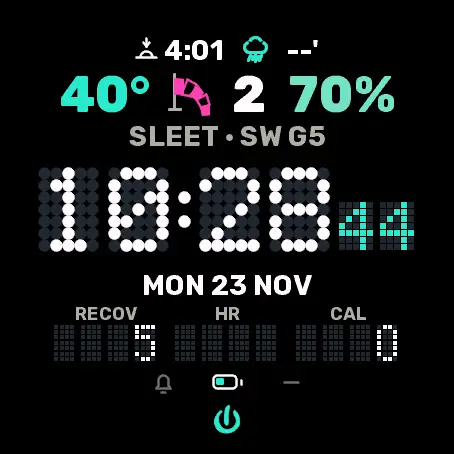
Lamps
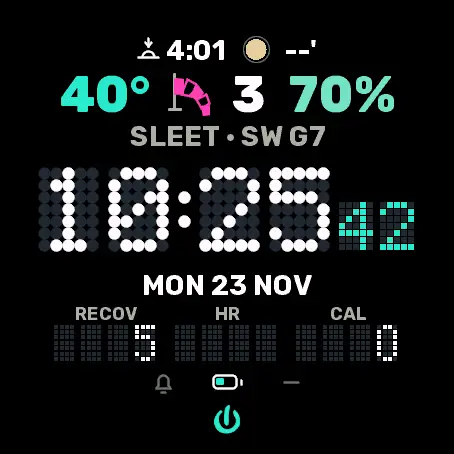
The time in lamp digits, with your station's temperature, wind and chance of rain above it.
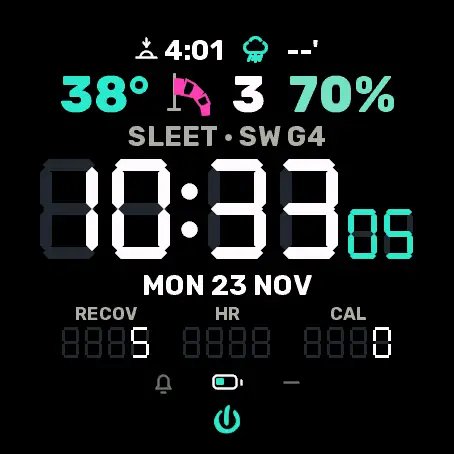
Segments
Segment digits, with the unlit segments showing as ghosts.
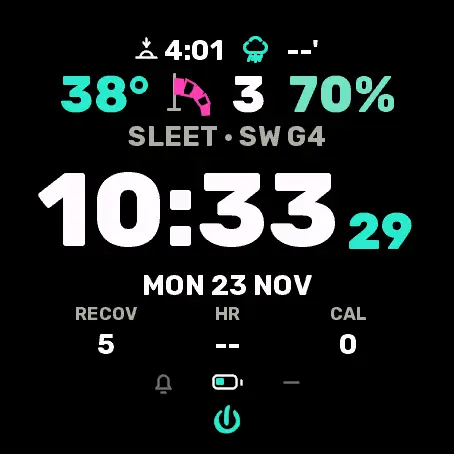
Solid
Solid digits for the cleanest read.
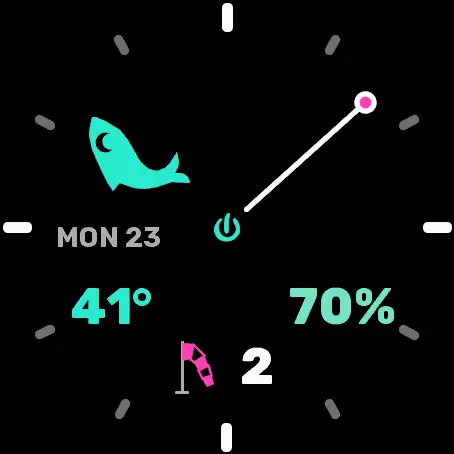
The cast
An analog face with a trout for the hour hand and a fly line for the minutes.
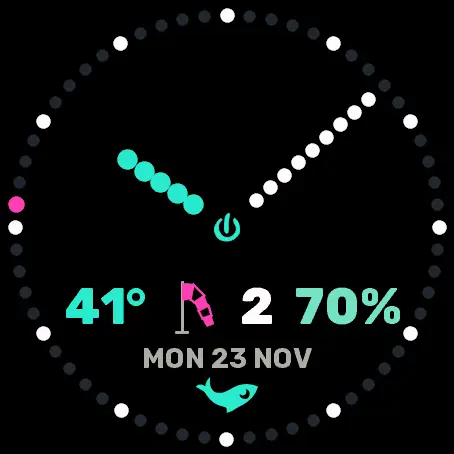
Lamp dial
An analog face with hands and a rim made of lamps.
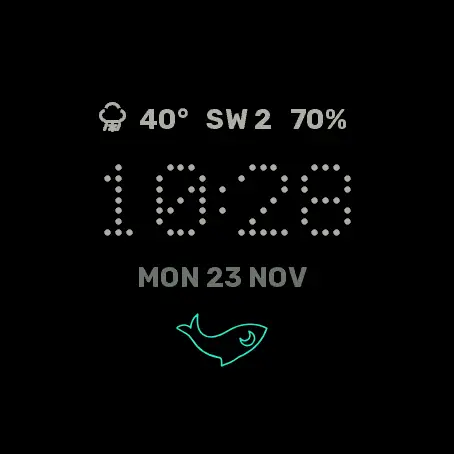
Always-on
On AMOLED screens, a thin, dim face with the time, date, sky icon and one line of weather.
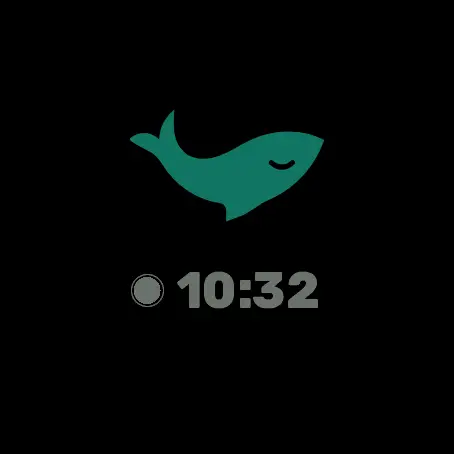
Sleep mode
A sleeping trout, the moon phase and the time. Nothing else.
Slots you choose
Nine slots to fill. Here the moon phase sits in the top row, between sunset and rain today.


The app behind the face
HyperWX for Tempest
HyperTrout gets your station's weather from HyperWX, our free Garmin app for Tempest weather stations. Install it on the same watch and the face shows your own wind, temperature and chance of rain. On its own, HyperWX adds forecasts, weather alerts, the northern lights and fishing times from the moon.
What it shows
Built to be read
Big lamp or segment digits, with high contrast in the dark and in full sun.
Weather first
Feels like temperature, wind speed with a windsock that swings and straightens with the wind (an arrow on the analog faces), chance of rain, the sky in a word, wind direction and gusts.
Three digit styles
Lamps, segments or solid. Unlit lamps and segments can show as ghosts on AMOLED screens.
Two analog faces
The cast, with a trout for the hour hand and a fly line for the minutes, and Lamp dial, with hands and a rim made of lamps.
Nine slots you choose
Three along the top, three numbers and three icons at the bottom. Pick from sunrise and sunset, the sky icon, moon phase, altitude, heart rate, calories, steps, recovery time, Body Battery, stress, battery, notifications, floors, active minutes, humidity, UV, pressure, rain today and gusts.
Temperature your way
Feels like, actual, or both when they differ by 5 degrees or more.
Time your way
12 or 24 hour time, with or without the colon, with or without seconds.
Home and away
At home it shows your own station. Type your home town in settings and it switches to Garmin's weather when you travel.
Built for battery
A watch face is on your wrist all day, so it should cost almost nothing to run. HyperTrout leaves the fetching to HyperWX and only draws.
- The face never downloads anything. It has no internet access at all.
- It reads the weather HyperWX already has on the watch.
- On AMOLED screens, always-on is a thin, dim face: the time, date, sky icon and one line of weather.
- Other screens keep the full face on all day, with seconds while you are looking at the watch.
- Sleep mode shows a sleeping trout, the moon phase and the time, and nothing else.
What you need
- For your station's weather: a Tempest weather station (opens in a new tab) and the free HyperWX app on the same watch
- Without HyperWX the face still works, using Garmin's weather
Watches
- Fenix 7, 7S and 7X, standard and Pro
- Fenix 8 AMOLED, Fenix 8 Pro and Fenix 8 Solar
- Fenix 9, Fenix 9 Pro and Fenix 9 Pro Solar
- Fenix E
- Instinct support is coming
Set it up
- 01
Set up HyperWX
Install HyperWX and add your Tempest token in its settings.
- 02
Pick the face
Install HyperTrout from the Connect IQ store and pick it as your watch face.
- 03
Make it yours
In Garmin Connect, open HyperTrout's settings to choose your digit style and slots. To switch to Garmin's weather when you travel, type your home town as Garmin's weather names it.
What's new
- Version 1.0.2. The northern lights: on a night when HyperWX says an aurora is possible or likely, the face says so under the weather, and when it is likely and dark the sky icon becomes the aurora. Needs HyperWX 1.0.2 or later. The sleeping trout now follows the watch's Sleep mode, not only Do Not Disturb.
- Version 1.0.1. Now for every Fenix 7, Fenix 8 and Fenix 9, including the Solar and Pro models and the Fenix E. Instinct support is coming. The analog faces show the wind as an arrow, so north and south winds read true. On watches without an always-on screen, seconds show while you are looking at the watch.
- Version 1.0.0. First release, for Fenix 8 AMOLED (43, 47 and 51 mm).
Privacy
HyperTrout has no internet access, so nothing it reads can leave your watch. It asks for Positioning for one reason: Garmin only tells a watch face which town its weather is for if the face has that permission, and the face compares that name with your home town to know when you are away. It never reads your position. It also has Garmin's permission to read what other apps on the watch share, which is how it gets the reading from HyperWX. It reads your heart rate, steps and the other numbers you choose to show only to draw them. We collect nothing and store nothing about you.
HyperTrout questions
Yes. HyperTrout is a free Garmin Connect IQ watch face that shows the wind, temperature and chance of rain from your own Tempest weather station, right on the face. It reads them from our free HyperWX app on the same watch.
For your own station's weather, yes: HyperWX on the same watch, with your Tempest token in its settings. Without HyperWX the face still works, using Garmin's weather.
Garmin's weather for where you are. Type your home town in HyperTrout's settings, as Garmin's weather names it, and the face switches by itself when you are away and back to your station when you are home.
Every Fenix 7, Fenix 8 and Fenix 9, including the Solar and Pro models, and the Fenix E. Instinct support is coming.
It is built not to. The face never downloads anything. It reads the weather HyperWX already has, and its always-on and sleep faces are thin and dim.
Nine slots: three along the top, three numbers and three icons at the bottom. Choose from sunrise and sunset, the sky icon, moon phase, altitude, heart rate, calories, steps, recovery time, Body Battery, stress, battery, notifications, floors, active minutes, humidity, UV, pressure, rain today and gusts.
Garmin only tells a watch face which town its weather is for if the face has that permission. HyperTrout compares that name with your home town to know when you are away. It never reads your position, and it has no internet access, so nothing it reads can leave your watch.
Yes. HyperTrout is free in the Garmin Connect IQ store.
No. HyperTrout is made in Wyoming by Imaginary Trout. It is not made by or affiliated with WeatherFlow-Tempest. Tempest is a trademark of WeatherFlow-Tempest, Inc.
HyperTrout is made in Wyoming by Imaginary Trout. It is not made by or affiliated with WeatherFlow-Tempest. Tempest is a trademark of WeatherFlow-Tempest, Inc. Garmin, Fenix, Body Battery and Connect IQ are trademarks of Garmin Ltd. or its subsidiaries.
Have an idea for a watch face?
We built HyperTrout because we wanted our own station on our watch faces. Tell us what you want on yours.
Start a project